Tuesday, 4 December 2012

Magazine Deconstruction 1

Magazine Deconstruction 1
 
The first layout of magazine advertisement I have deconstructed is the format which uses artwork from the dualbox/digipak. I have decided to deconstruct a advertisement from the Band "Grizzly Bears" which advertises their new album "Shields" which was released on September the 18th 2012. I found this advertisement in the free music magazine " The Fly" which can either be picked up in music stores such as HMV or be viewed online.

Magazine Advertisement Introduction

 Magazine Advertisement.
The second ancillary task for my coursework is to create a magazine advertisement for the release of artists album.
To do this I am going to begin by deconstructing different types of existing magazine advertisements. Advertisements for new Cd's often come in three different formats:
  1. A image of the dualbox/digipak with text advertising a new album.
  2. A image of the artist/band with text advertising a new album.
  3. A mix of both a image of the artist/band and a image of the dualbox/digipak with text advertising a new album.
All of these layouts come in a variety of sizes from A4 to a quarter of a A4 page. I am going to deconstruct one of each type of layout to both establish the generic conventions of CD magazine advertisements and pick which layout would most assist in the advertisement of my artists new debut album. I will then design my magazine advertisement and create it. 

Limited Edition Digipak

Limited Edition Digipak

When designing my digipak, I wanted to have a cover over it so the audience could almost open it like a present. I have decided to make my idea of this cover. The digipak that comes with the cover will be a limited edition for members of my target audience to buy and treasure. For mass production, just the digipak would be produced.

My digipak cover will have to be in keeping with my digipak to keep to the generic convention of digipaks having a house style. My idea for my digipak is to have my digipak wrapped up in a coffee stained cover sealed with a piece of real ribbon. I like this idea because of the connotations of the old looking cover and then opening it out to reveal something new. This also links with my music video. I used sepia colouring in my video to reflect the past. The coffee stained cover will be similar to the sepia colours used in my music video providing a link which some members of my target audience will be able to identify giving them a sense of self pleasure. 

I first measured out my digipak on a piece of A3 card and created the folds to make sure the piece of card was big enough. My folding and measurments can be seen below


After folding and discovering the size was perfect, I began coffee staining another piece of A3 card. Both sides had to be stained meaning this had to be done over two days. I stained oine side on the 21/11/2012 and the other on the 22/11/2012. I then re-measured out the space my digipak would take up so I could create the folds.


Thursday, 29 November 2012

Final Music Video and Audience Feedback

Final Music Video.

This is my final music video which has been uploaded to YouTube to I can receive audience feedback.


I used the social networking site of Facebook to advertise my music video to both members of my target audience and other audiences outside my target audience age range.  The music video is also publicly available on Youtube for people of the world to view and leave feedback or comments.

Some feedback can be seen on YouTube while other feedback was gained through Facebook as not all of the audience had a YouTube account to comment on the video.
Most of the feedback was positive. There were positive comments about the range of camera angles used and the lighting in most of the shots. One of the main criticisms however was the lip syncing. Lip syncing is incredibly difficult to get completely in time.  On the editing programme pinnacle, it appeared that the lip syncing was in time. However, once the video was exported and I viewed the video on another screen on a different programme, the lip syncing was slightly out.
My experience with lip syncing has opened my eyes to how editors must continually be changing the editing on a music video to get it absolutely precise before it is released to the general public.


Thursday, 22 November 2012

Photoshop and Final Digipak

Photoshop
To create my digipak, I used the photo modifying programme Adobe Photoshop elements 4.0. To begin with, I 'cut out' all of the objects that I was placing on my digipak. These included pieces of ribbon and the individual objects featured in the bird cage.

To cut out the piece of ribbon, I used the magic wand tool. I had to turn the tolerance down to make sure I didn't accidentally cut out any thin pieces of ribbon. I then went around the piece of ribbon to make sure all of the background was gone. In some places I had to use the magic background eraser to delete the background because the magic wand tool would differentiate the background from the ribbon. I then used the smude tool to round off any jagged pixels and make the image of the ribbon look more realistic. The results of this can be seen below:

My next step for the piece of ribbon was to modify the lighting and contrast. I felt the ribbon was not red enough in the original image I chose to cut out. Therefore, by fiddling with the lighting and contrast, I managed to brighten it up to make it look more effective and visually attractive on my digipak.  The difference in colour can be seen  on the pieces of ribbon displayed on the digipak.
To cut out all of my objects for my digipak, I used the same process. I used the magic wand tool with the tolerance turned down followed by the smudge tool to make the image look professional. On some of the objects, I fiddled with the brightness and contrast to make them more visually attractive and stand out more. Some examples of my cut out objects can be seen below.

After cutting out my objects, I started to make my digipak. I decided to use my template that I used for my designs. I imported my template into photoshop and started to add my images. It became clear however, that the quality of my images was being lost on the template. This was because of the low pixelation on the template. My digipak on the template can be seen below.


I could have carried on using this template. However, the poor quality of my images, pieces of ribbon
and text were not reflecting the amount of work I had put into the digipak. I then decided, using the measurements on the digipak template, to create individual sections of the digipak and put them together at a later stage to create my final digipak.

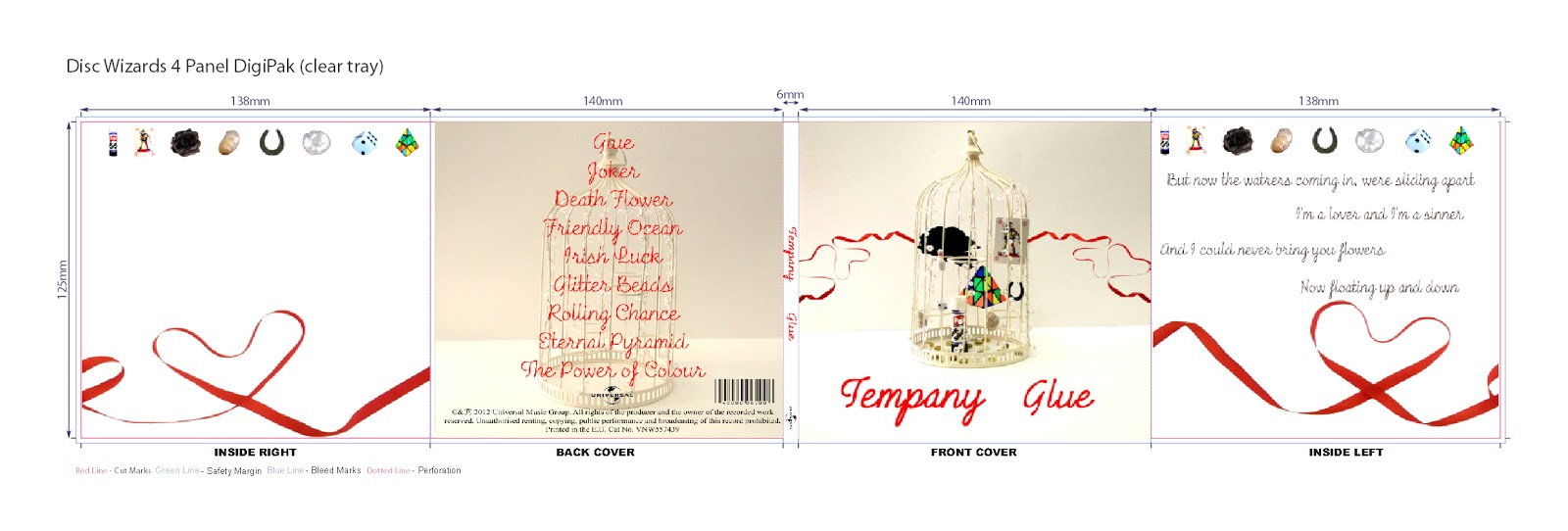
After individually constructing the 5 different sections of my digipak, the front, back, spine, inside left and inside right sections, I used a tool on photoshop to flatten the image. This combined all the different layers into one image. I then saved the different files in a new format; JPEG format. This allowed them to be saved as pictures instead of Photoshop images. I then saved a new digipak PDF template, downloaded from the website http://www.discwizards.com/cd-dvd-artwork-templates.htm. Using the programme Page Plus, I imported the PDf and tehn added my images to it to construct my digipak.
My final completed digipak can be seen below.


Sunday, 18 November 2012

Record Label Research

Record Label
 
If I was going to release my promotional package for my new artist, Tempany, my artist would need a Record Label. A Record Label is a company that coordinates the production, manufacture, distribution, marketing and promotion of music for a artist. They also enforce the copyright for sound recordings and music videos.  One of the generic conventions of a digipak is that the Record Label's logo will be displayed. For my digipak designs, I used Universal Music Group's logo because that is the record label that Nina Nesbitt, the artist who originally sung the song I used for my music video, is signed too. Therefore, I need to research different record labels to see which one would be the most suitable for my artist.
 
Universal Music Group(UMG)
 
Universal Music Group's roots can be traced back to 1934. It is the largest music company in the world and one of the 'big three'. It is owned by the French Media conglomerate Vivendi which also owns companies such as Universal film. UMG owns Universal Music Publishing group which is the second largest music publishing company in the world. In 2010, the company employed 6,967 people and had a total revenue of $6 billion. Some famous artists that are signed to the record label include Lady Gaga, Nicki Minaj, Tom Jones, Elton John and Ellie Goulding.
 
EMI
 
EMI is the forth largest buisness group and family of record labels in the recording industry. EMI was originally a British multinational music company head quatered in London, United Kingdom. EMI own some other record companies such as Parlophone and part of Virgin Records. The revenue for the company in 2009 was £1.072 billion. Famous artists singed to EMI include 30 Seconds to Mars, Lilly Allen, Foo Fighters, Gorillaz, Coldplay and R.E.M. On September 21st 2012, the sale of EMI to UMG was approved in both Europe and the United States by the European Commission and the Federal Trade commision. This deal came with the condition that the merged company divest one third of its total operations to other companies with a proven track record in the music industry to still make sure that the music industry market has some diversity.
 
Sony Music Entertainment (SNE)
SNE is the second largest music corporation in the world. It is owned and controlled by the Sony Corporation of America, the United States subsidiary of Japan's Sony Corporation.
The company which evolved into Sony Music was founded in 1929. Its Revenue for 2010 was $5,672 million. The company also own other smaller record labels, the most famous being Columbia Records. Famous artists include Alicia Keys, Backstreet Boys, Fatboy Slim, Johnny Cash, One Direction and Whitney Houston.
 
Independant Labels
 
There are many independent labels across the world. An independent record label is a record label operating without the funding of or outside the organisations of a major record label. A great number of bands and artists start on independent labels. In the UK there are lots and lots of independent record labels such as Bleeding Heart Records, O Rosa Records and Stolen Recordings. A full list of notable UK independent labels can be seen here: http://en.wikipedia.org/wiki/List_of_independent_UK_record_labels


I have decided not to go with a Independant Record Label. Independants give more control to the artist about what music they would like to produce. However, they lack the connections and subsidiary and parent companies that can provide other resources which they cannot.

This leaves me with a choice of the 'three' major record labels. I have decided not to go with Sony Music Entertainment. This is because they mainly focus on the American market, which could be useful for my artist to 'crack' America but for the launch of her career in the UK, not so good. EMI own such record labels as parlophone which have a good track record with making successful artists. However, since the company was brought out by the parent company of UMG, vivendi, I feel as if my artist would be better off being part of Universal Music Group, their original company. They have all of the resources to promote my artist across several different mediums. 


Thursday, 15 November 2012

Reshoot of Digipak Images

Original Images - Reshoot
 
Where my images from my first photo shoot of the bird cage did not work and could not be modified to fit my digipak on Photoshop, I had to take more images of them. I wanted  a completely white background behind my birdcage to use as the background for my digipak I first tried using a white sheet. This was more effective when uploaded into photoshop than the images with the light diffuser box. However, despite adjusting the lighting and contrast in Photoshop, the crease in the fabric could not be hidden.
I then attempted using sheets of white A3 paper. When I uploaded these photos to Photoshop to check the quality, I found that the idea of white paper was perfect for what I wanted to crease. However, the joining of several pieces of white paper had created shadows which made the photo look unprofessional.
I then tried using sheets of A1 sized white paper. This technique finally gave me the images that I wanted for my digipak. Examples of all my techniques can be seen below.


Once I had found the technique that gave me effective images that I could use on my digipak, I experimented with lighting. I used one bright light as well as the flash on my still digital camera to try get the most professional looking and visually interesting photos as possible. Some of my original images can be seen below.

 
I have chosen the shot seen in the top right hand corner to use on the back cover of my digipak. I like how the light from the side has reflected onto the beads on the cage. I will edit this photo in Photoshop to make it look professional on my digipak.
The image in the bottom right hand corner is the image I am going to use on the front of my digipak.  I have chosen to use this image because of the high quality. The colours from the objects stand out  clearly against the white background. My use of the light coming in from the left hand side of the image is being reflected on the beads attached to the cage adding another dimension to the image.  I will edit this image in Photoshop to make it look professional and attractive to my target audience.


I also took images of all the objects I used in the bird cage singularly. These would be used on the inside of my digipak to represent the songs and reinforce the house style of the digipak. The original images can be seen below.